Questo
sito non è più aggiornato dal 4 febbraio 2003
Per eventuali aggiornamenti e informazioni, rivolgersi allo staff del sito Web-Ring.it
DOC-to-RTF
Esistono principalmente due formati in cui MS-Word salva i propri documenti di testo, quello di default ha per estensione .DOC, mentre un altro formato molto diffuso è .RTF, che sta per Rich Text Format. Sostanzialmente qui ci interessa una particolarità del formato DOC, quella che consente di gestire le macro.
Le
macro sono dei programmi in VisualBasic che qualsiasi utente minimamente esperto può realizzare per
gli applicativi di Office. Queste macro permettono di gestire alcuni
oggetti nella pagina visualizzata che interagiscono con l'utente, come pulsanti,
nuovi comandi, effetti sonori e visivi, serie di operazioni pianificate.
Il
problema delle macro sta nella loro pericolosità, infatti questi
programmi possono avere un contenuto dannoso per il PC. In questo caso si parla
di macrovirus, fino a poco tempo fa la categoria di virus più diffusa, perché estremamente
semplice da programmare.
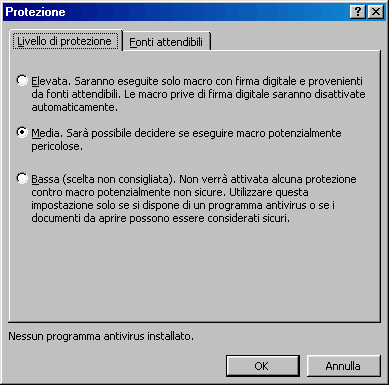
Una prima difesa dai macrovirus la si può impostare, in Word, nel menù Strumenti, selezionando la voce Macro e Protezione. Si aprirà la seguente finestra di dialogo:
Meglio
impostare la protezione su media perché, come si evince dalle descrizioni, questa è l'unica che ci permette di
sapere se il documento che stiamo aprendo contiene o no delle macro. Quindi
entrare nel fascicolo Fonti
Attendibili di questa
stessa finestra di dialogo ed assicurarsi che la finestrella centrale non
contenga alcuna voce (se ce ne sono, selezionarle e premere il
pulsante rimuovi) e deselezionare la checkbox che riporta la dicitura Considera
attendibili tutti i modelli. Dato l'Ok, sarà necessario chiudere Word prima di continuare a lavorare.
Questa
procedura va ripetuta anche con Excel, Access e PowerPoint.
Perché sfiduciare tutti i possessori di certificati di protezione? I motivi sono più d'uno. Innanzitutto tramite questo canale potremmo per sbaglio accettare dei certificati da fonti non sicure e pagarne le conseguenze a nostra insaputa. Inoltre, la maggiore azienda di certificazione di software informatico, la VeriSign, l'anno scorso ha annunciato di aver venduto per errore alcuni certificati a un tizio che s'era spacciato per un dirigente della Microsoft! Oltre al fatto che alcuni virus sono in grado di scavalcare questa modesta barriera di sicurezza semplicemente disattivandola.
Avendo impostato la protezione su Media, non appena tenteremo di aprire un documento contenente una macro, apparirà la seguente finestra di dialogo:

Ora possiamo decidere se disattivare la macro e il suo contenuto potenzialmente dannoso o attivarla e fidarci di essa.
Va detto che esistono dei programmi, come i traduttori automatici o alcuni vocabolari, che installano in Word, Excel e Access alcuni pulsanti con funzioni particolari. Questi pulsanti, di fatto, sono delle macro. Impostando la protezione su Alta non sarà possibile utilizzare questi pulsanti.
Quando riceviamo per posta elettronica o per mezzo di qualche floppy disk un documento Office è necessario controllarlo con un buon programma antivirus aggiornato e nemmeno così fidarsi del tutto. Se, per esempio, il macrovirus lo programmassi io stesso senza scopiazzare da qualche vecchia macro documentata, ci sono alte probabilità che l'antivirus non riconosca affatto il pericolo neppure con la scansione euristica impostata sul massimo livello.
Se però vogliamo lavorare in relativa tranquillità, almeno con i documenti Word, possiamo affidarci al formato RTF. Questo formato mantiene intatte tutte le caratteristiche del documento Word in formato DOC, ma con una semplice differenza: non può contenere macro.
Se dobbiamo farci inviare un documento da un altro PC, sarebbe buona cosa richiederlo sempre in
formato RTF e, nel contempo, noi stessi dovremmo imparare ad utilizzare questo formato per
condividere documenti con altri utenti.
Per salvare il proprio documento di
testo in formato RTF si dovrà selezionare la relativa voce in Salva con nome:

Ma se riceviamo il documento, o molti documenti in formato DOC e temiamo possano contenere dei macrovirus, come possiamo comportarci?
Proprio
per Word2000 esiste uno strumento di Office che permette di convertire uno o più
file DOC contemporaneamente in altri formati, tra cui RTF.
Questo strumento non è installato nel PC e lo si deve copiare
direttamente dal CD-Rom d'installazione di Office.
Il
nome di questo applicativo è CONVERT9, e siccome non è ben accessibile, lo si può
cercare con il comando Trova nel CD-Rom di installazione di Office2000, o
scaricarlo (compresso in formato Zip) da qui:
Lo si dovrà salvare nella cartella C:\programmi\microsoft office\templates\1040 nella quale si trovano altri modelli di documento.
Da questo momento in poi sarà disponibile in Word2000 un nuovo strumento, e sarà accessibile dal menù File/Nuovo entrando nel fascicolo Altri documenti e aprendo il modello Conversione batch guidata.
A causa delle modifiche che abbiamo apportato alla protezione dalle macro per le fonti attendibili, apparirà una finestra di dialogo che altrimenti non sarebbe apparsa (e ciò è un bene: meglio essere scocciati con finestre di dialogo che con reinstallazioni di Windows!). Questa finestra ci avverte che una macro sta per essere eseguita e l'autore è Microsoft Corporation.

E' consigliabile non selezionare la checkbox che consente di considerare sempre attendibili le macro provenienti dalla Microsoft o da chiunque altro. Quindi premere il pulsate Attiva macro in tutta tranquillità. Si aprirà la seguente finestra di dialogo:

Selezioniamo Avanti:
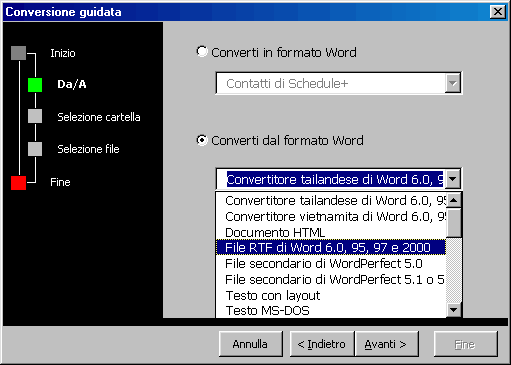
In questa finestra si può decidere di convertire in un documento MS-Word (Converti in formato Word) un file di altro tipo oppure convertire in altri formati un file DOC (Converti dal formato Word).
Selezionando questa seconda opzione, si potranno operare due scelte al fine
di raggiungere il nostro scopo.
Scegliendo il formato denominato File RTF di Word 6.0,
95, 97 e 2000 il documento verrà convertito in un file con estensione
DOC ma dal contenuto tipico dei file RTF. Selezionando la cartella di
destinazione uguale a quella d'origine il documento verrà sovrascritto.
Scegliendo il formato denominato Rich Text Format (RTF)
il documento verrà convertito in un file RTF compatibile con tutti gli
elaboratori di testo che supportano questo formato. Anche selezionando la
medesima cartella come origine e destinazione il file non verrà sovrascritto,
in quanto l'estensione assegnata non sarà DOC, ma RTF.
Cliccando su Avanti, il programma ci chiederà in quale cartella si trova il file di origine (DOC) e dove si vorrà salvare il file destinatario (RTF):

Quindi il programma mostrerà la finestra di conversione vera e propria:

Qui si potrà selezionare tutti i documenti disponibili nella cartella d'origine che, con un doppio click, si sposteranno nel riquadro da convertire, in questo modo:

Fatto ciò, cliccare su Avanti e quindi Fine.
La conversione sarà avviata in background, non verranno aperti i documenti DOC selezionati, né i documenti RTF frutto della conversione. Un'ulteriore finestra di dialogo ci segnalerà che l'operazione è andata a buon fine:

Adesso nella cartella che abbiamo selezionato come destinazione troveremo i documenti convertiti in RTF.
Ma possiamo essere assolutamente sicuri? La risposta, purtroppo, è no. I laboratori della KasperskyLab hanno rilevato la possibilità che un virus faccia breccia nel nostro sistema attraverso file RTF, anche se è un'eventualità estremamente remota: se il documento RTF contiene un collegamento automatico a una macro in rete o su internet, appena si apre il documento verrà cercato la macro e se il pc è connesso in rete o in internet e il livello di protezione contro le macro è nullo, allora la macro si avvia. Ovviamente si tratta di una combinazione d'eventi estremamente remota, ma la Microsoft poco tempo fa ha rilasciato una patch che permette di risolvere proprio questo problema.
Un secondo pericolo è dato da un'altra caratteristica del formato RTF:
quella di poter implementare nel documento del codice eseguibile e la cosa non
è affatto una bella notizia.
Per chiarire meglio la cosa, è bene fare un esempio: si apre un documento RTF e
al suo interno, tra il testo e altre immagini, è presente un piccolo pulsante.
Cliccando su questo pulsante viene automaticamente estratto e mandato al sistema
operativo un codice eseguibile. Il sistema operativo analizza il codice e,
grazie all'association table, capisce se si tratta di un file binario (EXE o
COM), batch (BAT o PIF) o VisualBasic (VBS) e lo esegue.
Ovviamente questo codice potrebbe essere tanto un file innocuo quanto un virus!
Ecco di seguito il documento in inglese che parla dei pericoli nel campo dei file RTF, scaricato dal sito Viruslist.com dei laboratori Kaspersky:
| RTF Files: A Wolf in Sheep's Clothing? |
Wednesday, May 30, 2001, 17:01 |
|
RTF (Rich Text Format), as presented to many users, is considered to be a so-called universal remedy against obtrusive macro-viruses and any other sort of malicious code. Numerous anti-virus companies categorically recommend not accepting any standard MS Word (DOC) files. It is true that RTF files cannot contain a macro-program (macros) in basic form – in the instance of conversion by standard means from other formats, the macros are automatically deleted – however, this same RTF feature has a flip side to it: users are lulled into a sense of security, ignoring the basic principles of safety when working with RTF documents. What is RTF? Rich
Text Format is the most widespread standard for presenting graphical and
text data. Practically all text editors functioning on various types of
processors and operating systems support RTF, which, when created on a
PC compatible with Windows, easily allows, for example, for MacOS users
to read the files interchangeably. A fly in the ointment As
with any remedy connected with information technology, a standard RTF
file also has not been able to avoid contamination by a fly - in this
case, two. RTF or not RTF? The
main purpose of this article is to bring to light the danger awaiting
users working with documents in RTF format, and to recommend the safest
means for dealing with such a danger. 1.
Install the proper patches in a timely manner for use with the text
editor, especially if they concern working with RTF documents. |
|
Va ricordato che per legge la distribuzione di materiale informatico infetto da virus è considerato reato. Ciò vale anche nel caso in cui si è ricevuto del materiale infetto e lo si è redistribuito ignorandone il contenuto. In genere non è considerato argomento discolpante la non rilevazione del virus da parte di programmi antivirus.
Quindi le regole di sicurezza da applicare al materiale Office sono semplici ma categoriche:
mantenere i livelli di protezione su Media (per sapere "se" i documenti contengono macro);
mai attivare macro provenienti da fonti non sicure e diffidare delle sicure;
aggiornare spesso il proprio programma antivirus, abilitandone la scansione euristica, e sottoporre a controllo tutto il materiale in entrata e in uscita dal PC;
non concedere a nessuna fonte il privilegio di essere considerata sempre come attendibile;
richiedere sempre i documenti nel formato RTF o convertirli come sopra descritto, e inviare documenti solo il questo formato.