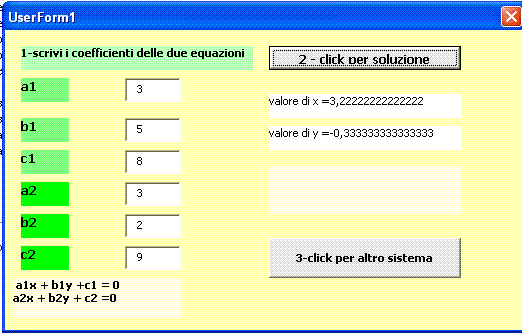
soluzione sistema lineare con visual basic
inserire coefficienti e poi cliccare per soluzione o altro sistema


VERSION 5.00
Begin {C62A69F0-16DC-11CE-9E98-00AA00574A4F} UserForm1
   Caption         =   "UserForm1"
   ClientHeight    =   4500
   ClientLeft      =   45
   ClientTop       =   330
   ClientWidth     =   7785
   OleObjectBlob   =   "sistema1.frx":0000
   StartUpPosition =   1  'CenterOwner
End
Attribute VB_Name = "UserForm1"
Attribute VB_GlobalNameSpace = False
Attribute VB_Creatable = False
Attribute VB_PredeclaredId = True
Attribute VB_Exposed = False
Private Sub CommandButton1_Click()
Dim a1, b1, c1, a2, b2, c2 As Double
Dim x, y, dx, dy, ds As Double
a1 = ax1.Text
b1 = bx1.Text
c1 = cx1.Text
a2 = ax2.Text
b2 = bx2.Text
c2 = cx2.Text
ds = a1 * b2 - a2 * b1
dx = c1 * b2 - c2 * b1
dy = a1 * c2 - a2 * c1
If ds <> 0 Then
x = dx / ds
y = dy / ds
soluziox.Caption = "valore di x =" & x
soluzioy.Caption = "valore di y =" & y
End If
If (ds = 0) And (dx <> 0) And (dy <> 0) Then verifica.Caption = " sistema impossibile"
If (ds = 0) And (dx = 0) And (dy = 0) Then verifica.Caption = "sistema indeterminato"
End Sub
Private Sub CommandButton2_Click()
ax1 = ""
ax2 = ""
bx1 = ""
bx2 = ""
cx1 = ""
cx2 = ""
soluziox.Caption = ""
soluzioy.Caption = ""
verifica.Caption = ""
ax1.SetFocus
End Sub