A French Phonetic is available thanks to Thierry Billon.

The first and second steps are very time consuming.
The text input functions were developed to improve speed and security in the input phase:
- a database of about four thousand Tibetan valid syllables helps avoid many typing errors;
- the input of every syllable in Wylie transliteration form produces the output of the Tibetan characters on one line and of the phonetic on the other. The automatic phonetic is not always right: often the sequence of syllables requires adjustments, but the program creates a good trace and avoids typing;
- for complex Sanskrit syllables (that escape from the basic Wylie transliteration) every user can build his own database containing a "Wylie-like shortcut", the corresponding Tibetan characters (adding glyphs from the True Type font with the ALT+number technique), and the suitable phonetics.
Other functions are the printing of selected lines and the output to a text file, which is easily imported and formatted with a word processor for the final layout.
4.1 - Filenames ending with _TX are text database created and updated by the BOD_X program; select one or select the NEW TEXT button to create a new one.
The 800x600 and 1024x768 screen option allow the use of wider lines in input text if you have a larger screen.

The "output" mark is set when this line has already been outputted to a text file.
The SELECTED checkbox marks the current line for selection for output or print command.
The CANCEL button deletes the current line. Buttons with arrows move through the file.
The INPUT button activates the input window.
The OUTPUT writes selected lines to a text file.
The PRINT button produces a printed report of selected lines.
Wylie box contains the input data; Tibetan, Phonetic and Translation box contain the corresponding syllables in Tibetan font and their phonetics, these boxes are all editable.
The "X" button closes the current text file.
4.3 - If Dictionary and / or Glossary files are open the "Wylie Search" command is visible and it is possible from here to search for the selected Wylie syllables.

The insertion of main punctuation marks is done using the corresponding buttons.
ADD LINE writes the current fields in the text database and makes the window ready for the next line.
END INPUT returns to the main window.

CONTINUE takes the syllable as it is (Tibetan and Phonetic field will be wrong: a manual adjustment will be compulsory).
CHANGE returns to the input form for correction.
INSERT adds the new entry in the personal syllable database.

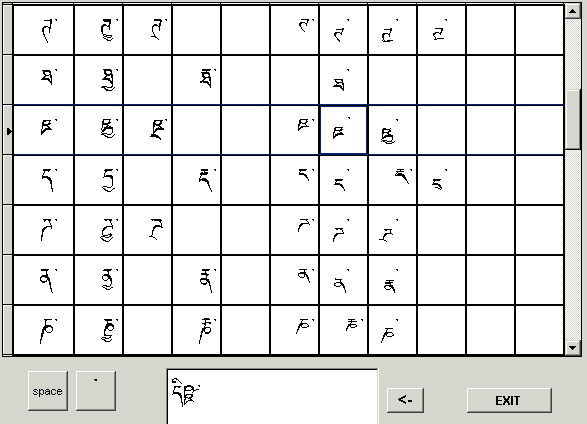
Using the "visual syllable builder", the composed syllable is automatically transferred into the TFW field.
An example of "shortcut": a non-Wylie syllable has been added, along with its Tibetan character representation and phonetic, in the personal syllable database.


| home page | next page | mail for any comment or request. |
 Valid HTML 4.01 Transitional